
Exploring Tokens
Exploring Tokens
The Tokens tab is your entry point to every market on Gametoken. You can browse without connecting a wallet.
Browse
- Games — browse all of a game's tokens together, grouped by game.
- Sort — order tokens by token name, game name, price, 24-hour change, or volume.
- Featured — the hero area highlights New (recently listed) tokens.
Each entry shows the token image, symbol, and game name alongside its current price, 24-hour change, and volume. Prices and volume update in real time.
The token page
Selecting a token opens its detail page:
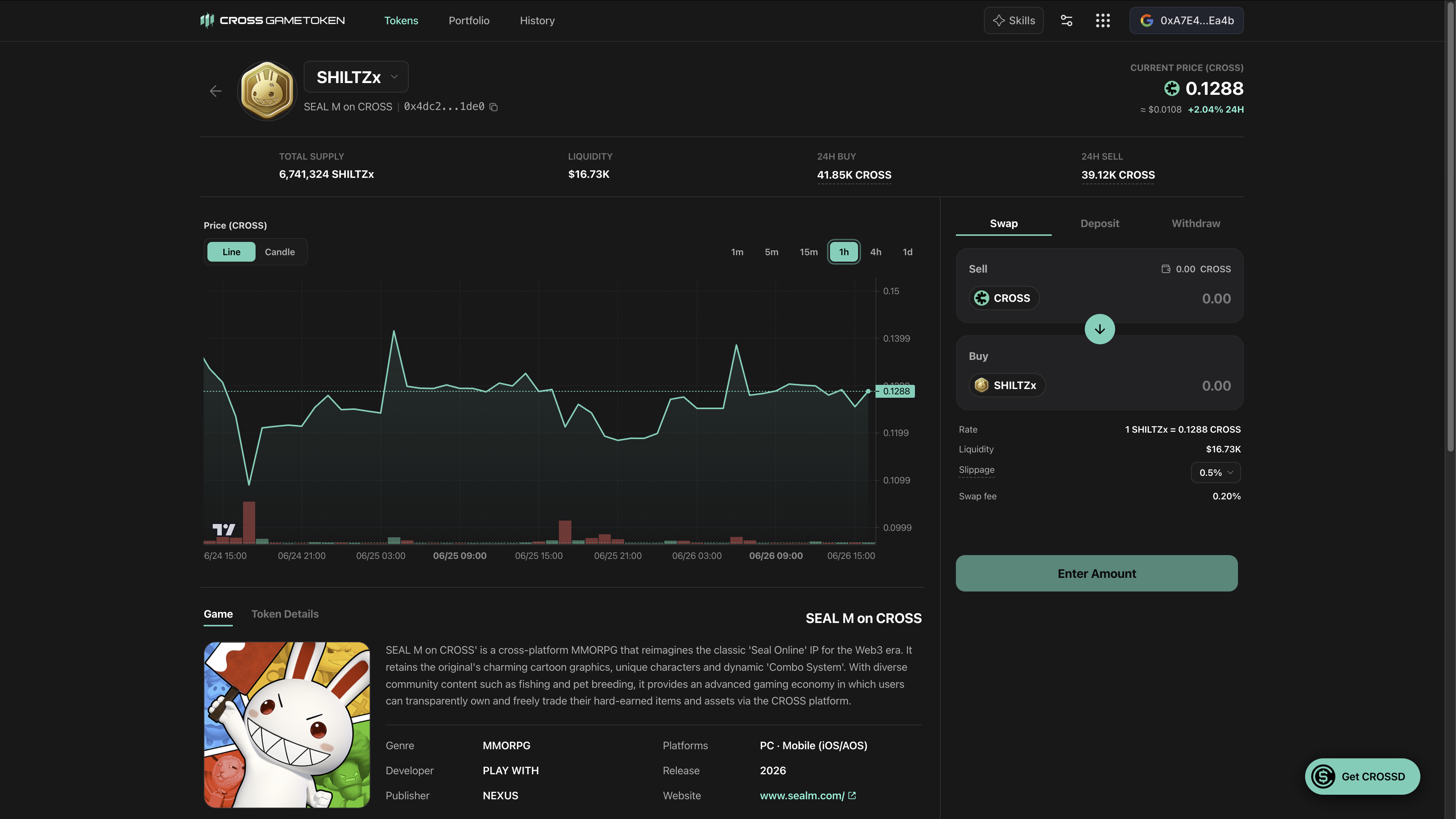
- Header — token logo, name, symbol, contract address (with copy and a block-explorer link), and a share button.
- Key metrics — current price (in $CROSS, with a USD reference), 24-hour change, 24-hour volume split into buys and sells, and total supply.
- Price chart — toggle between Line (default) and Candle, across timeframes from 1 minute to 1 day, with a volume histogram and a live indicator.
- Info tabs — About the Game (description, official links, media) and Token Details (contract, trading pair, LP token, and pool TVL).
- Live trades — a real-time table of recent trades (time, type, price, amount, total, trader, and transaction link); your own trades are highlighted.
From the token page you can open the trade panel to Swap, or to add/remove liquidity (Deposit / Withdraw).